
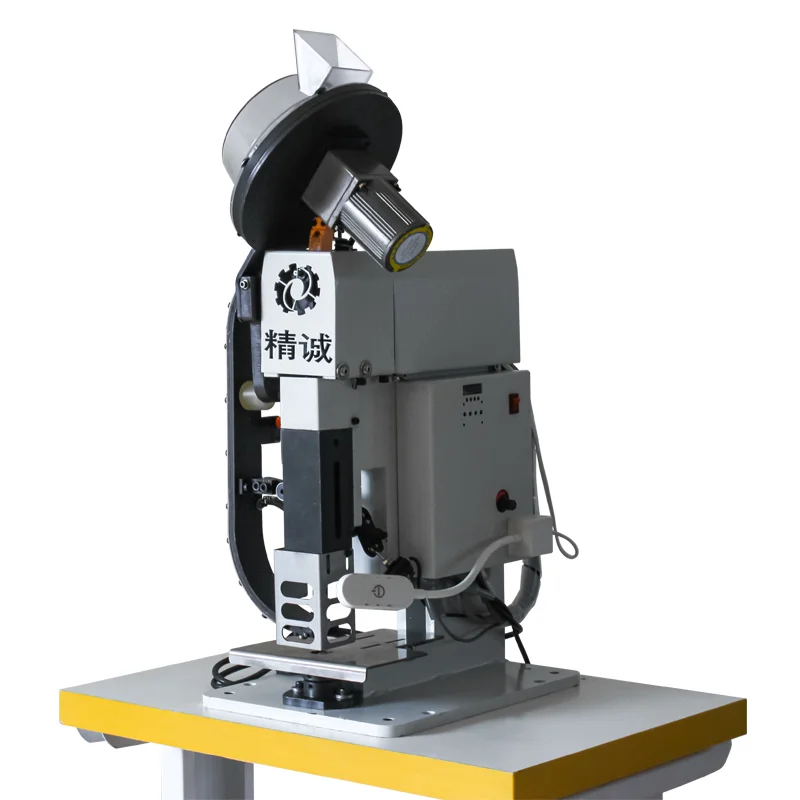
You should always check the most vital eyelet machine safety features before making a purchase. Look for emergency stop buttons, physical guards, sensor-based protections, and interlocking systems. Operator safety matters most, so choose machines that meet international standards like CE and OSHA.
Advanced safety mechanisms help prevent injuries and improve productivity. Trusted brands such as QC Machinery offer reliable solutions for your workplace.
Key Takeaways
- Always check for emergency stop buttons on eyelet machines. These buttons allow you to halt the machine instantly, preventing injuries during unexpected situations.
- Look for physical guards and shields that protect you from moving parts. Ensure they are in place and functioning to lower the risk of accidents.
- Choose machines with sensor-based safety features like light curtains and optical sensors. These systems detect hazards and stop the machine to keep you safe.
- Verify that interlocking mechanisms are present. They prevent the machine from operating under unsafe conditions, ensuring your safety during use.
- Select machines that comply with CE and OSHA standards. This compliance guarantees that the machine meets important safety regulations, protecting you and your team.
Emergency Stop Buttons
Importance for Operator Safety
You need to understand why emergency stop buttons matter on eyelet machines. These buttons protect you and your team from harm during unexpected situations. If something goes wrong, you can press the emergency stop and halt the machine instantly. This quick action can prevent serious injuries or damage.
Emergency stop buttons give you control over the machine, even when things happen fast. You do not have to wait for the machine to finish its cycle. You can stop it right away.
Many accidents in factories happen because operators cannot stop machines quickly. Emergency stop buttons solve this problem. They are a key part of any machine’s safety system. When you know you can stop the machine at any moment, you feel more confident at work.
This confidence helps you focus on your tasks and reduces stress. You also help your company meet important safety rules and standards.
Identifying Emergency Stops
You should always check for emergency stop buttons before using any eyelet machine. These buttons are usually large and red, so you can spot them easily. Manufacturers place them in areas you can reach quickly, even if you are in a hurry or under stress.
Look for emergency stops near the main control panel and other key points around the machine.
Here are some features you should look for:
- Large, mushroom-shaped design for easy pressing
- Bright red color for high visibility
- Clear labels or symbols showing their function
- Placement in accessible locations
If you see these features, you know the machine is designed with your safety in mind. Always test the emergency stop before starting work. Make sure it works and stops the machine right away. If you cannot find the emergency stop button, ask your supervisor or check the user manual.
Never use a machine if you are unsure about its emergency stop system.
Tip: Regularly inspect emergency stop buttons for damage or wear. A working emergency stop can save lives.
Physical Guards and Shields
Types of Safety Guards
You need to know about the main types of guards that protect you when using eyelet machines. Each guard has a special purpose. Some guards stay in place all the time, while others move or adjust to fit different jobs. The table below shows the main types of guards you will find on modern machines:
| Type of Guard | Description |
|---|---|
| Fixed Guards | Permanent barriers that prevent access to hazardous areas. |
| Interlocking Guards | Automatically shut down machinery when the guard is removed. |
| Adjustable Guards | Can be modified to accommodate different tasks while still providing safety. |
Fixed guards cover dangerous parts and never move. Interlocking guards stop the machine if you open or remove them. Adjustable guards let you change their position for different types of eyelets or materials. You should always check which guards your machine uses before starting work.
Role in Preventing Injuries
Physical guards and shields play a big role in keeping you safe. They block your hands and fingers from moving parts that could cause harm. You do not have to worry about getting too close to the machine’s pinch points. Guards also help protect everyone in the area, not just the person operating the machine.
- Machine guards must protect against all reasonable scenarios of employee interaction with machinery.
- Guards should ensure safety for all employees, not just those operating the machinery.
- Compliance with OSHA standards requires comprehensive protection against potential hazards.
When you use machines with proper guards, you lower the risk of accidents. You also help your workplace meet important safety rules. If you work with different types of eyelets, you need guards that adjust easily. This makes your job safer and more efficient.
Always inspect guards before use and never remove them during operation. Good guards give you peace of mind and help you focus on your work.
Tip: If you notice a missing or damaged guard, report it right away. Never operate a machine without all guards in place.
Sensor-Based Safety Features
Operational Light Curtains
You can find operational light curtains on many modern eyelet machines. These devices use beams of light to create an invisible barrier around dangerous parts. If your hand or any object breaks the light beam, the machine stops immediately. This quick response helps prevent injuries and keeps you safe while working.
Light curtains detect when you are close to hazardous areas. The machine will not operate if you cross into the danger zone. This technology lowers the risk of accidents. You do not have to rely only on physical guards.
The system adds another layer of protection. Many factories use light curtains because they work well and reduce injuries. You gain confidence knowing the machine will stop if you make a mistake.
Note: Always check that the light curtain system works before starting your shift. Clean the sensors regularly to avoid false alarms.
Photocell and Optical Sensors
Photocells and optical sensors help you operate eyelet machines safely and efficiently. These sensors monitor the area around the machine. They detect if materials are not aligned or if unknown objects are present. The machine will not start if the sensors find a problem.
You avoid jams and accidents by using these sensors.
You can see these sensors near the die or adapter. They scan for anything out of place. If you try to operate the machine with your hand in the wrong spot, the sensors block the cycle. This feature protects you and your coworkers. You also improve productivity because the machine only works when everything is correct.
Here is a simple table showing the difference between light curtains and optical sensors:
| Feature | Light Curtains | Photocell/Optical Sensors |
|---|---|---|
| Detects Human Presence | Yes | Sometimes |
| Stops Machine Cycle | Instantly | Instantly |
| Checks Material Setup | No | Yes |
You should always look for machines with sensor-based safety features. These systems help you avoid injuries and keep your workplace safe.
Interlocking Mechanisms
Preventing Unsafe Operation
You need to understand how interlocking mechanisms protect you when you use an eyelet machine. Interlocks act as safety barriers that stop the machine from running if conditions are unsafe. For example, if you open a safety guard or if the die is not positioned correctly, the machine will not operate.
This feature prevents accidents during setup, maintenance, or routine operation.
Interlocking systems use different methods to keep you safe. Some rely on physical parts, while others use electrical circuits or software logic. You can see how each type works in the table below:
| Type of Interlock | Function |
|---|---|
| Safety Interlocks | Prevent accidents and injuries by ensuring equipment operates safely. |
| Operational Interlocks | Control the sequence of operations to prevent equipment damage. |
| Electrical Interlocks | Prevent equipment from operating in an unsafe manner through circuits. |
| Software-Based Interlocks | Use programmed logic to ensure safe operation of equipment. |
| Mechanical Interlocks | Utilize physical mechanisms to prevent unsafe equipment operation. |
| Sequential Interlocks | Ensure operations occur in a safe and efficient sequence. |
| Permissive Interlocks | Allow operation only when specific safety conditions are met. |
| Protective Interlocks | Prevent operation when safety conditions are not satisfied. |
You benefit from these systems because they reduce the risk of injury. Interlocks also help you avoid machine damage and costly downtime. You stay safe, and your workplace stays productive.
Tip: Always check that interlocks are working before you start the machine. If you notice a problem, report it right away.
QC Machinery’s Interlock Systems
QC Machinery designs eyelet machines with advanced interlocking mechanisms. You get reliable protection because their systems combine mechanical, electrical, and software-based interlocks.
For example, the machine will not cycle if the safety guard is open or if the die is not aligned. You can trust that the machine will only operate when all safety conditions are met.
QC Machinery’s interlocks help you follow international safety standards like CE and OSHA. You gain peace of mind knowing the machine will not run unless everything is safe. The company’s focus on innovation means you get the latest safety technology.
You also benefit from clear instructions and easy-to-use controls.
You should always inspect interlock systems before starting work. QC Machinery makes this process simple with visible indicators and a user-friendly design. You protect yourself and your team by choosing machines with robust interlocking features.
Dual-Action and Foot Pedal Controls
Reducing Accidental Activation
You want to avoid accidental machine starts when working with eyelet machines. Dual-action and foot pedal controls help you achieve this goal. These controls require you to perform a specific sequence before the machine operates. This design reduces the chance of unintentional activation.
You stay safer because the machine only works when you intend it to.
Many modern machines use a single-stroke feature. This means the machine completes only one cycle for each press of the foot pedal. You do not have to worry about the machine running multiple times by mistake. The foot pedal often includes a non-slip pad.
This pad keeps your foot steady and prevents slips that could trigger the machine. Ergonomic positioning of the pedal encourages you to stand in a safe posture. You feel comfortable and in control.
The table below shows how these safety measures work together:
| Safety Measure | Description |
|---|---|
| Single-stroke feature | Allows the press to cycle only once per foot control depression, minimizing accidental activation. |
| Protection from unintended operation | Ensures the foot pedal is safeguarded against accidental activation. |
| Non-slip pad | Reduces the risk of slipping, which can lead to unintended activation. |
| Ergonomic positioning | Encourages a safer working posture, reducing the likelihood of accidental activation. |
| Interlocking safeguards | Ensures the foot control is inoperable when safety measures are not functioning. |
You benefit from these features every day. They make your work safer and improve the ease of use of the machine.
QC Machinery Pedal Safety
QC Machinery designs its eyelet machines with your safety in mind. You get dual-action and foot pedal controls that follow strict safety standards. The pedals require a clear, intentional action to start the machine. This setup prevents accidental starts and keeps you in control.
You will notice that QC Machinery uses non-slip pads on their pedals. These pads help you keep your footing, even during long shifts. The pedals sit in an ergonomic position, so you can work comfortably and safely. Interlocking safeguards ensure the pedal will not work if any safety feature is not active.
You can trust that the machine will not operate unless all conditions are safe.
QC Machinery also focuses on ease of use. You can operate the machine smoothly, even if you are new to eyelet machines. The controls are simple to understand and quick to learn. This approach helps you stay productive while maintaining a safe work environment.
Tip: Always check the pedal and safety features before you start your shift. A quick inspection can prevent accidents and keep you safe.
Stable Base and Construction
Importance of Machine Stability
You need a stable base when you operate an eyelet machine. Stability keeps the machine from moving or shaking during use. A solid foundation protects you from unexpected shifts that could cause accidents. You feel safer when the machine stays in place. Stability also improves accuracy.
The machine sets eyelets in the right spot every time. You avoid mistakes and wasted materials.
Manufacturers use special materials to build stable machines. High-performance engineering plastics help reduce thermal expansion. These plastics do not absorb much moisture, so the machine stays strong even in humid environments.
Low internal stress in the materials keeps the machine’s shape and prevents warping. Dimensional stability matters most when you work in extreme conditions. The machine keeps its size and form throughout its life.
Tip: Always check the machine’s base before starting work. Make sure it sits flat on the floor and does not wobble.
Evaluating Build Quality
You must look at the build quality before buying an eyelet machine. Strong construction means the machine lasts longer and works better. You should check the frame, joints, and fasteners. Look for thick metal parts and sturdy engineering plastics. These materials resist wear and tear.
Use this checklist to help you evaluate build quality:
- Inspect the frame for cracks or weak spots.
- Check that all bolts and screws are tight.
- Look for smooth surfaces and clean welds.
- Test the machine for vibrations during operation.
- Review the manufacturer’s specifications for material types.
| Feature | What to Check |
|---|---|
| Frame Material | Thick metal or engineering plastic |
| Joints and Fasteners | Tight, secure, no rust |
| Surface Finish | Smooth, no rough edges |
| Stability During Use | No shaking or excessive vibration |
You get better performance and safety from machines with high build quality. A stable base and strong construction help you work confidently and efficiently.
Clear Labels and Instructions
Safety Warnings
You must pay attention to safety warnings on every eyelet machine. Clear labels help you spot hazards before you start working. Manufacturers place warning signs near moving parts, pinch points, and electrical panels. These signs use bright colors and simple symbols.
You can understand them quickly, even if you are new to the machine.
Here are some common safety warning labels you might see:
- ⚠️ “Keep hands clear”
- 🔌 “Disconnect power before maintenance”
- 🚫 “Do not operate without guards”
You should always read these warnings before you begin. Labels remind you to follow safety measures and avoid risky actions. If you see a faded or missing label, report it right away. A clear warning can prevent accidents and keep you safe.
Tip: Take a moment to review all warning labels each day. This habit helps you remember important safety measures.
User Guidance and Training
You need proper instructions to operate eyelet machines safely. Manufacturers provide user manuals, quick-start guides, and training videos. These resources explain how to set up the machine, use controls, and follow safety measures. You should read the manual before your first use.
If you have questions, ask your supervisor or trainer.
Training sessions teach you how to handle emergencies and perform routine maintenance. You learn how to use emergency stop buttons, adjust guards, and check sensors. Good training helps you work confidently and reduces mistakes.
| Training Resource | What You Learn |
|---|---|
| User Manual | Setup, operation, safety steps |
| Quick-Start Guide | Basic controls, first steps |
| Safety Video | Emergency actions, safe habits |
You should practice what you learn in training. If you forget a step, review the instructions. Clear guidance and regular training help you follow safety measures and protect yourself at work.
Maintenance and Lockout Features
Easy Maintenance Access
You need easy access to maintain your eyelet machine safely. Good design helps you reach important parts without trouble. When you can service the machine quickly, you reduce downtime and keep production running smoothly. Manufacturers often add features that make maintenance simple and safe.
For example, an intuitive control panel lets you check machine status and adjust settings with ease. You do not have to guess what each button does. Clear labels and logical layouts help you find what you need fast.
Here is a table showing features that support easy maintenance and operator safety:
| Feature | Description |
|---|---|
| Operator control panel | Provides intuitive access to options |
| Easy maintenance | Facilitates quick servicing |
| Operator safety first | Ensures safety during operation |
You should look for machines that focus on operator safety. Easy maintenance access means you spend less time fixing problems and more time working. You also lower the risk of accidents because you do not need to remove many covers or reach into tight spaces.
- Easy maintenance access
- Intuitive control panel
- Focus on operator safety
Tip: Always follow the manufacturer’s instructions when performing maintenance. This keeps you safe and protects the machine.
Lockout/Tagout for Safety
Lockout/Tagout (LOTO) procedures protect you during maintenance. These steps stop the machine from starting by accident. You must shut off the power and lock the switch before you begin repairs. Tagging the equipment warns others not to turn it on. This process keeps everyone safe.
Injuries, amputations, and even deaths occur when machine parts or equipment suddenly turn on or release stored energy during maintenance. Lockout/Tagout covers the procedures, equipment, and training necessary to allow workers to safely maintain or repair machines and equipment.
LOTO procedures involve several important steps:
- Isolate hazardous energy sources and confirm the machine is off.
- Lock out the energy source and tag the equipment to alert others.
- Make sure no one can start the machine until maintenance is complete.
For example, if you need to repair a part, you first turn off the power and apply a lock. No one else can start the machine while you work. This prevents accidents and keeps you safe.
Note: Proper lockout/tagout procedures are crucial for protecting workers from injuries caused by unexpected equipment startups.
Compliance and Certification
CE and OSHA Standards
You must check for compliance with international safety standards when you buy an eyelet machine. CE certification shows that the machine meets European safety, health, and environmental requirements.
OSHA standards protect workers in the United States by setting rules for machine guarding and safe operation. These certifications help you trust the machine’s safety features.
Here is a simple table to help you understand the difference:
| Standard | Region | Focus | What It Means for You |
|---|---|---|---|
| CE | Europe | Safety, health, environment | Machine meets strict EU rules |
| OSHA | United States | Worker safety, machine guarding | Machine protects operators |
You should look for the CE mark on the machine or in the manual. OSHA compliance often appears in the product description or technical documents. These certifications mean the manufacturer follows strict guidelines. You get peace of mind knowing the machine protects you and your coworkers.
Tip: Always ask for proof of certification before you buy. Certified machines help you avoid legal issues and workplace injuries.
QC Machinery’s Safety Commitment
QC Machinery puts your safety first. The company follows CE and OSHA standards for every eyelet machine. You benefit from advanced safety features, reliable construction, and clear instructions. QC Machinery uses in-house manufacturing and strict quality control to ensure every machine meets international requirements.
You can trust QC Machinery because the company holds ISO9001 certification. This shows a strong commitment to quality management. The machines include physical guards, emergency stop buttons, sensor-based protections, and interlocking systems. You get a safe and efficient machine for your workplace.
Here are some ways QC Machinery supports your safety:
- Provides clear documentation for all certifications
- Offers training and user guides for safe operation
- Designs machines with operator safety in mind
Note: QC Machinery exports to over 60 countries. You join a global community of users who value safety and quality.
You should choose QC Machinery if you want a machine that meets international standards and protects your team.
Eyelet Machine Safety Features Overview
Key Benefits for Buyers
When you choose a machine with advanced eyelet machine safety features, you protect yourself and your team. These features help you set eyelets quickly and safely. You avoid injuries because the machine stops if your hand gets too close.
Emergency stop buttons, physical guards, and sensors work together to keep you safe. You can focus on placing eyelets in the right spot every time.
You also meet important safety rules. Machines that follow CE and OSHA standards help you avoid fines and legal trouble. You show your team that you care about their safety. With these features, you spend less time worrying about accidents and more time making products with perfect eyelets.
Here is a quick look at how these features help you:
| Benefit | How It Helps You |
|---|---|
| Injury Prevention | Stops the machine if danger is detected |
| Compliance | Meets CE and OSHA safety standards |
| Productivity | Lets you set more eyelets with less risk |
| Peace of Mind | Keeps you and your team confident |
Why Choose QC Machinery?
QC Machinery gives you some of the best eyelet machine safety features in the industry. You get machines with emergency stops, interlocks, and advanced sensors. These features help you set eyelets in fabric, leather, or other materials without worry. You can trust the machine to protect you every time you use it.
QC Machinery designs each machine to last. You get strong construction and easy-to-use controls. The company tests every machine to make sure it meets international safety standards. You join a global group of users who rely on QC Machinery for safe and efficient eyelet production.
If you want a machine that helps you set eyelets safely and quickly, QC Machinery is a smart choice. You get safety, quality, and support from a trusted brand.
Tip: Visit QC Machinery’s official website to learn more about their eyelet machine safety features and see how they can help you improve your production of eyelets.
Conclusion
When you invest in eyelet machines with advanced safety features, you protect your team and improve your workflow. Always check for emergency stops, physical guards, sensors, and interlocks. Machines that meet international standards offer long-term benefits:
| Benefit | Description |
|---|---|
| Improved productivity | Machines enhance output compared to manual tools. |
| Better consistency | Ensures uniform quality and professional results. |
| Reduced operator fatigue | Minimizes strain during repetitive tasks. |
| Long-term cost savings | Facilitates in-house processing, reducing outsourcing. |
| Compliance with safety regulations | Adheres to local and international safety standards. |
Trusted brands like QC Machinery reinforce strict quality checks and clear documentation. You should inspect safety features closely and contact manufacturers for guidance on maintenance, certification, and safe operation.
FAQ
What safety certifications should I look for in an eyelet machine?
You should check for CE certification and OSHA compliance. These certifications show that the machine meets international safety standards. Always ask the manufacturer for proof of certification before you buy.
How do emergency stop buttons work on eyelet machines?
You press the emergency stop button to halt the machine instantly. This feature helps you prevent injuries during unexpected situations. Always test the emergency stop before starting your shift.
Why are physical guards important for operator safety?
Physical guards block your hands and fingers from moving parts. You avoid accidental contact with dangerous areas. Always inspect guards before use and never operate the machine if a guard is missing or damaged.
Can I operate the machine if the safety guard is open?
No, you cannot. Interlocking mechanisms prevent the machine from running when the safety guard is open. This feature keeps you safe during setup and maintenance.
What should I do if a safety feature is not working?
Stop using the machine right away. Report the issue to your supervisor or maintenance team. Never operate an eyelet machine with a faulty safety feature.