
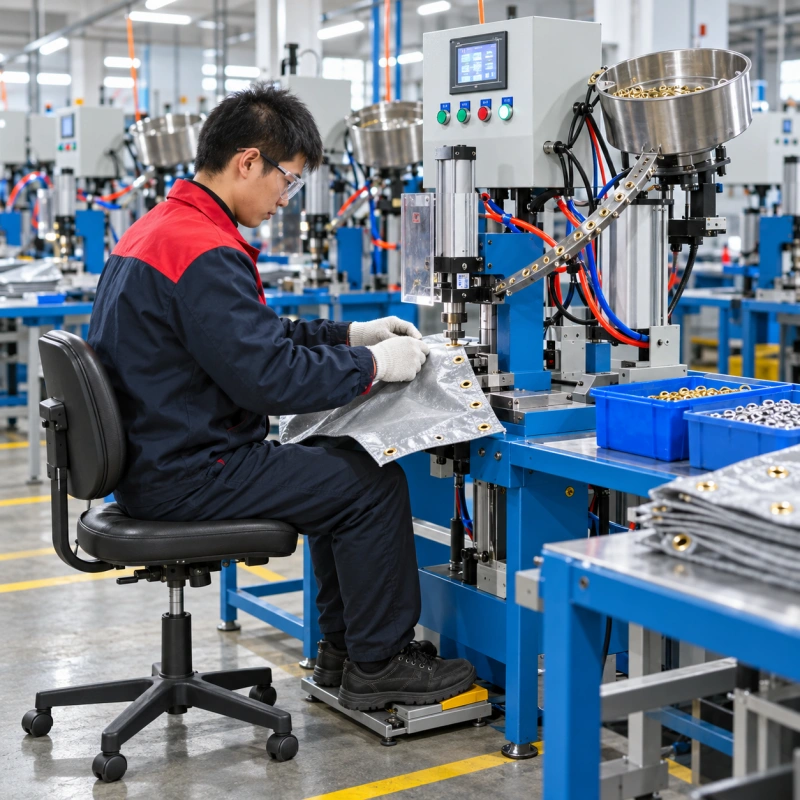
An eyelet machine may repeat the same setting cycle all day, but the eyelet machine operator does more than activate it. Depending on the machine and product, you pick up a workpiece, align the setting location, present the material, check the result and move the piece away.
If every cycle also makes you stretch for a stack, twist toward an output bin or search for a washer, the workstation adds handling time that the machine’s rated speed cannot show.
A useful layout lets you see the setting point, handle the actual material and operate the controls from a balanced position. It also makes the process repeatable across a shift and across different operators. Start with the job and the person, then arrange the machine and surrounding space the complete flow.
Map the Work Before Moving the Bench
Watch a representative run with the actual eyelet and workpiece, plus a washer if the process uses one. Follow one item from incoming material through positioning, setting, required inspection and output. Note where the operator’s hands and feet travel, where the material hangs or drags, and when the operator changes posture to see the setting location or remove a finished piece.
Repeat the observation with the largest or most awkward product in the planned job mix. A small label, a long webbing strap and a large curtain panel need very different clearances around the same machine. Mark the normal operator position and sketch the setting point, controls, incoming material, component supply, inspection area, rejects and finished output. That sketch gives you a layout to test.
Set the Working Height Around the Actual Setting Point
The relevant height is where you position and support the material, rather than the top of the machine cabinet. Stand or sit at the station with a production workpiece. Can you see its setting location without repeatedly bending your neck? Can you align the workpiece using the approved operating method without lifting your shoulders, reaching far forward or pressing your wrists against an edge?
For light positioning work, a working level near the operator’s elbow can be a useful starting point. Adjust it for visibility, workpiece thickness and the machine’s permitted setup. There is no universal height for every eyelet station. A thick stack or large panel may need a different support arrangement than a small fabric piece.
The OSHA sewing workstation guidance describes how a surface that is too low encourages hunching, while one that is too high raises the shoulders. Apply that posture check to your own process rather than copying a sewing-table dimension.
Support large material near the setting point with an adjacent table or approved fixture where appropriate. Keep the required clearance around the machine and follow its instructions for guards, controls and access.
Choose Sitting or Standing for the Job
Seated work can suit small, repeatable items when you can bring the chair close enough to the setting point, support both feet and leave space for the pedal leg. Check knee and thigh clearance under the adjacent work surface. Standing can provide more room to move a wide or long workpiece, but prolonged stationary standing also deserves attention.
Where the machine, task and risk assessment permit, provide a stable way to change posture or alternate compatible tasks.
Test different operators. If raising a seat leaves the feet unsupported, adjust the seated arrangement and foot support together.
Bring Materials Within a Comfortable Reach
Keep frequently handled items near the normal working position: incoming pieces, eyelets and washers when the operator supplies them, and the finished-output location. Put less frequently used items farther away. The aim is to avoid full arm extension or trunk rotation on each cycle.
OSHA’s guidance on moving material at sewing stations similarly recommends bringing material bins near the worker and close to table height instead of requiring repeated reaches behind, overhead or into deep containers.
Check the reach again when a bin is nearly empty, since its contents may become harder to reach. Smaller, regularly replenished trays or an angled presentation may help. Keep eyelets, washers and rejects in distinct, clearly identified locations.
For broad fabric, banners or tarpaulin, support and clearance may matter more than component-tray distance. Leave room to turn or advance the panel without pulling it against the tooling or dragging it across the floor. If you add a guide, stop or support, test representative samples for eyelet position and material condition before adopting the arrangement.
Place the Foot Pedal Where the Operator Can Stay Balanced
If the machine uses a foot control, establish where the operator normally sits or stands to present the material. The pedal should be reachable without repeated leg extension, hip rotation or a sideways shift of body weight. Keep a stable position for the other foot and enough space to release the pedal and move the working leg freely.
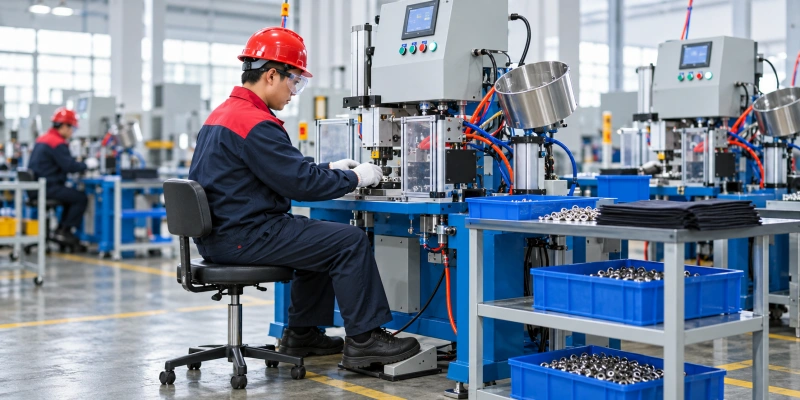
A pedal can be too close as well as too far away. Observe several real cycles. Does the operator pull the foot back, hold the ankle at an awkward angle, lean sideways or move the chair away from the work surface?
OSHA identifies pedal distance and sustained awkward leg posture as concerns in sewing stations. CCOHS advises placing seated foot tasks in front of the worker to avoid hip twisting. Use these as checks, then confirm the final position against the machine’s control design and installation instructions.
Keep the pedal stable and its line out of the normal travel path. Follow the manufacturer’s instructions and site risk assessment before relocating or changing a control. Apply the same reach test to hand controls.
Make the Setting Point Easy to See
Small holes, washers that blend into the material and reflective eyelet finishes can be hard to judge under uneven light. Observe the station with the actual workpiece and the operator in position. Can you see the setting location, alignment reference and features required for inspection without leaning toward the tooling? Does the operator’s arm cast a shadow? Does a lamp reflect off a metal eyelet or glossy coating?
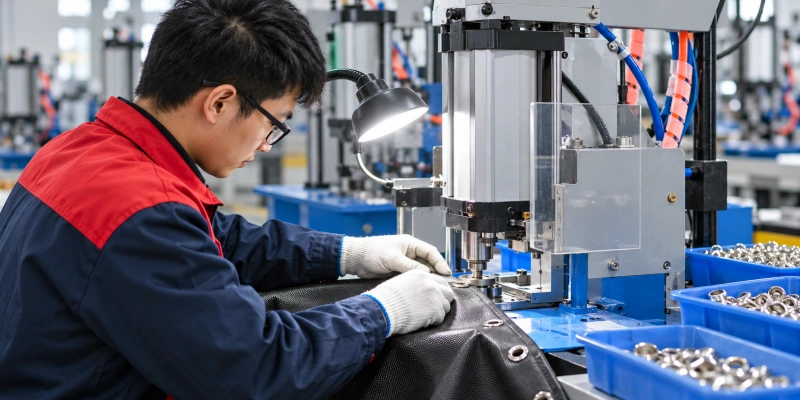
Provide adequate general lighting, then add adjustable task lighting at the setting or inspection point if needed. Position it to improve contrast without glare or shadow. Check dark, light and reflective materials, as well as the underside when the inspection plan calls for it. OSHA recommends adjustable task lighting for detailed fabric setup, but the position should be tested at this workstation.
Keep the approved sample and inspection tools accessible. Lighting does not replace the current control plan or acceptance criteria.
Arrange a Clear Input-to-Output Path
Assign a place to each stage: incoming work, setting, required inspection, accepted output and rejected or held pieces. Arrange these places around the operator’s normal position. The path may run left to right, right to left or front to side, depending on the product and available space. Finished pieces should not pile up behind the operator or block the next workpiece.
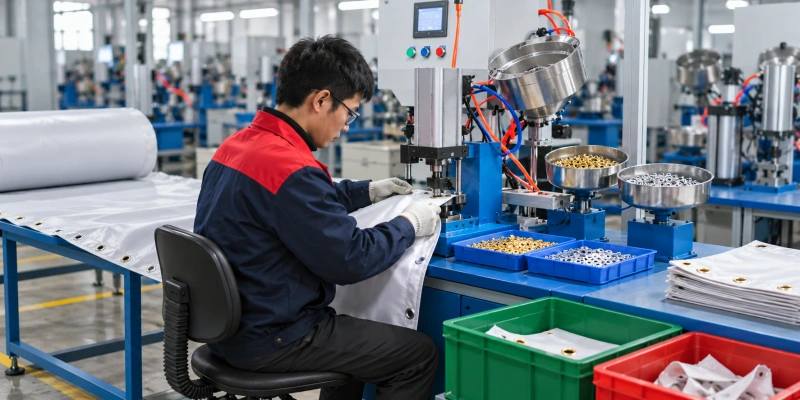
With manual component supply, include eyelet and washer pickup where applicable. With automatic feeding, the operator may instead replenish a feeder, present the material and remove the workpiece. Feeding components automatically changes the handling pattern; it does not necessarily automate material alignment, inspection or output. Check where replenishment and authorized stoppage recovery fit into the layout.
Preserve required access and controls. Never obstruct a safeguard to shorten a movement. QC Machinery covers machine protection separately in its eyelet machine safety features guide.
Look for Repeated Motions That Add Up
A reach that looks minor during a short demonstration can become a recurring burden over a shift. Watch a normal production run and note pauses to flatten material, search for a component, draw a stack closer or place an accepted item. Ask the operator which motions become uncomfortable later in the run, and compare that feedback with what you observe.
Adjust one element at a time and compare operator posture, handling steps, accepted output and rejects over representative runs. A tidier bench alone is not evidence of higher output.
Record useful tray, support, light and pedal positions for different jobs. Pass temporary constraints to the next shift through the eyelet machine shift handover process.
Design for a Sustainable Production Rhythm
The press stroke is only one part of the production cycle. Reaching for a panel, aligning it, setting each eyelet, inspecting the result and clearing output all take time. Timing the machine alone misses those steps. A short trial can also overstate the rate that operators can maintain when fatigue or replenishment becomes relevant later in the shift.
Measure the full workflow with representative material. Record machine cycles, accepted eyelet settings and finished workpieces separately; one workpiece may need several settings. Include normal material presentation, required inspection, replenishment, short stops and rejects in the observed production window.
QC Machinery’s capacity planning guide explains how those observations inform machine requirements. Its cycle-time verification guide compares machine cycle speed with output measured at the station.
Repeat the trial when product dimensions, eyelets per item or operator coverage changes. Faster automatic feeding may reveal a bottleneck in material presentation or removal.
A Practical Workstation Audit
Run this check with the actual operator and production material. Record what you observe, make one proposed change and repeat the check after a normal trial. Follow the machine manual, approved procedures and local risk assessment for any equipment changes.
- Working point: Can the operator see the setting point and present the material by the approved method while keeping the shoulders relaxed and the trunk near upright?
- Material support: Does the workpiece stay supported while it is located, set and moved away?
- Reach: Are frequently handled pieces and components accessible without repeated stretching or twisting, even when a container is nearly empty?
- Foot control: If fitted, can the operator reach and release the pedal without shifting posture or losing stable support?
- Visibility: Are the hole, setting point and required inspection features visible without glare or a recurring shadow?
- Flow: Do incoming, accepted, rejected and held pieces have distinct positions that do not interrupt the next cycle?
- Variation: Does the layout still work for another operator and the largest planned workpiece?
- Evidence: Does a representative run show acceptable settings, workable handling and a rate the operator can sustain?
When a check fails, describe the specific motion or obstruction. For example, ‘The eyelet tray becomes hard to reach when it is half empty’ gives the team something concrete to change.
FAQs
What If the Eyelet Machine Has a Fixed Working Height?
Assess the height at the material-support and setting point, then check the operator’s view, shoulder position and reach with the real workpiece. Where the machine height cannot be changed, an approved adjacent support surface, suitable seating or a stable standing arrangement may improve the task. Verify that any change preserves the required guarding, control access and material path.
What If the Foot Pedal Cannot Be Moved?
Start by checking whether the operator position, seat and material support can be adjusted within the machine’s approved setup. Do not extend, rewire or reposition a control without the manufacturer’s instructions and the site’s risk assessment. If the operator still has to twist or stretch on every cycle, raise the limitation with the machine supplier before standardizing the station.
How Should Two Operators Share One Eyelet Workstation?
Test the station with each operator and record the approved seat, support, tray and task-light positions that work for the job. Allow time to reset those positions at shift change, then confirm the view of the setting point and access to controls. A layout that fits one operator does not automatically fit the next.
Does Automatic Eyelet Feeding Remove the Need for Workstation Planning?
No. Feeding may remove repeated component pickup, but the operator may still present and advance the workpiece, inspect settings, replenish the feeder and clear finished material. Map those remaining steps with the actual product. If you compare configurations, measure accepted settings and finished items separately, especially when each item needs more than one eyelet.
Plan the Station Around Your Product
Plan the relationship between the setting point, material support, controls and surrounding space the actual operator and product. Test the full flow before using the machine’s rated speed as a production estimate. A better tray, support, light or pedal position can remove unnecessary motion when the change also preserves the machine’s approved setup and the quality of the finished eyelet.
If you are planning a new eyelet station or revising an existing line, send QC Machinery the eyelet specifications, washer details if applicable, material type and dimensions, target output, machine configuration, and photos or a layout sketch of the current area. We can discuss how the machine and workstation might fit your production flow.